



Seite
Reference documents of the Mautic Privacy Project, funded by NLnet through the NGI0 Commons Fund. Both documents were written in Google Docs during milestones 1a and 1b; this page is now their canonical version.
- Mautic Privacy Project RFC (milestone 1b)
- Privacy audit and technical discovery report (milestone 1a)
Mautic Privacy Project RFC
Goals & non-goals
- Mautic offer tracking privacy choices and actually respect them
- Mautic is able to work with truly anonymous data, so no individual identifiers bypass privacy controls
- Platform functionality shouldn’t be made unusable by options defined by the user in the Privacy Centre.
- There must be a centralized tracking consent control for contacts
Not solved with this project:
- Profiling controls, allowing it to be stopped where required.
- Identity / Recognition control.
- Entirely address Erasure, anonymizing personal data where the right to erasure applies
- Consent management, lawful basis, rectification and everything else GDPR-related.
Terminology
User: Someone with a login to Mautic.
Contact: A person Mautic has a record for, once we know something identifying about them (email, form submission, etc).
Visitor: Someone browsing a tracked site that Mautic hasn't matched to a contact yet.
Preference center: The contact-facing page where someone manages their own communication and tracking preferences.
DNT: Do Not Track, the browser header.
GPC: Global Privacy Control, the newer browser-level opt-out signal.
Consent: A specific yes/no someone gave for one purpose, freely and knowingly.
Channel: A way of reaching someone (email, sms, push, etc).
Subscription: Someone's current status for a channel or topic (subscribed, unsubscribed, etc).
Truly anonymous: analytics that cannot reasonably be linked back to an identifiable visitor or contact.
Profiling: Infer something about the person based on their data.
Personalization: Use people's data to show them something different from what’s shown to others.
Identity / Recognition: Know who the person is + be able to differentiate them.
Automatically remove/anonymize data after a defined period
Retention · Data minimization
Form submission retention and cleanup
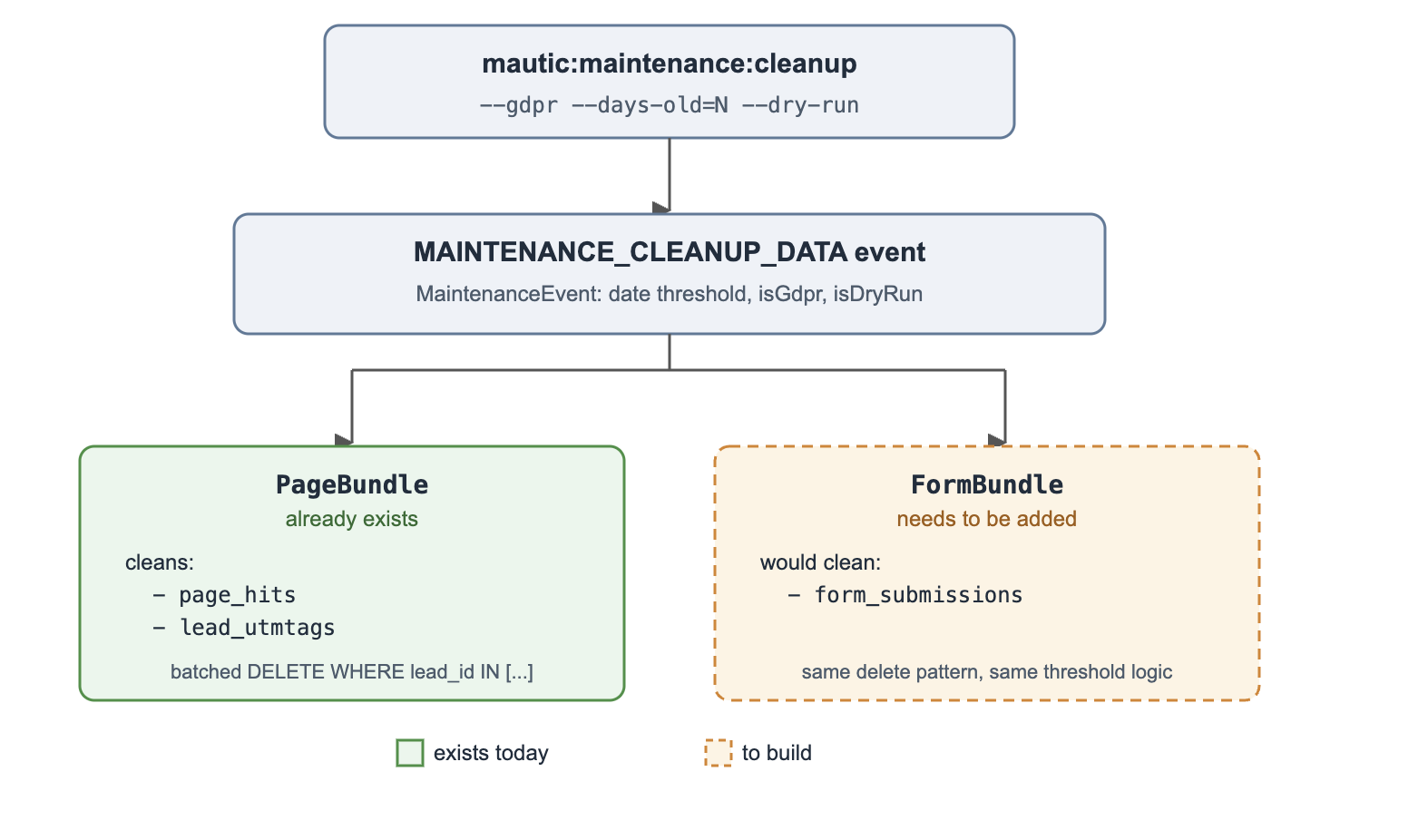
In scope We plan to follow the approach of separating stats from actual content, not relying on the actual submission rows for the count. Each submission can bring the count up, stored separately to differentiate “Amount of times this form received submissions” from “Current submissions count”.
FormBundle gets its own listener on the existing MAINTENANCE_CLEANUP_DATA event, same pattern PageBundle already uses for page_hits. No new command, no new cron. Submissions are hard-deleted.
Prevent tracking before the legal condition is satisfied
Tracking controls
“Tracking” happens when you’re collecting people’s data in an identifiable way, allowing them to reconnect events to the same person, even if indirectly.
In the DNT specification (https://www.w3.org/TR/tracking-dnt/), W3C defines tracking as:
“Tracking is the collection of data regarding a particular user's activity across multiple distinct contexts...”
It also defines Not Tracking as a state where:
“data collected via the designated resource is not used for tracking and will not be combined with other data in a form that would enable tracking.”
The W3C compliance specification also says that, under DNT: 1, data may still be collected when:
“the data is permanently de-identified as defined in this specification.”
It gives an example of a service:
“counts visitors' country of origin and device type but removes identifiers in order to permanently de-identify collected data.”
And concludes that, in that case:
“the party is not tracking the user”
W3C defines permanently de-identified data as data for which:
“there exists a high level of confidence that no human subject of the data can be identified, directly or indirectly...”
When removing any identifiable information, for example, device fingerprint, ID or similar, the recording action falls out of the tracking definition and becomes purely statistical numbers.
This leads to our first requirement. Refusal of identifiable or persistent behavioral processing MUST NOT, by itself, prevent Mautic from collecting analytics that cannot reasonably be linked back to an identifiable visitor or contact.
Anonymous analytics also MUST NOT create or update a contact, use a persistent visitor identifier, later be merged into an identified contact, retain identifiers allowing singling-out of the visitor or expose individual-level behavioral history.
Mautic MUST NOT create a persistent “anonymous contact” solely as a result of a pageview when the relevant tracking purpose has not been permitted.
All functionalities will be able to stop creating activity records on the contact profile and associating behavioral information with them. Mautic starts showing aggregate analytics, truly anonymous counts on the interface by default. If disabled tracking is a Mautic configuration, counts are collected but never associated with contacts. If it’s a contact preference, the essential recognition is made to keep suppression and behavioral record writing is blocked on their profile.
The mtc.js script then sends analytics data without any identifier. Allowed, for example: page hits, page session duration, rough device (example, “it’s an iOS”, but no specific browser user agent details at all). Blocked: Visitor ID, Contact ID, reusable session ID, e-mail address (including parameters in URL), IP address, persistent identifier cookie, any fingerprint.
You’ll be able to know there were 679 email opens, 840 page hits but no idea who the people were. Enabling tracking later doesn’t make it possible to recover tracking history during the time the functionality was disabled or contact opted-out. This is the requirement for truly anonymous analytics.
PageBundle\Entity\Hit already supports this shape: the lead relationship is SET NULL on delete, not cascade, and PageModel::hitPage() already accepts a null contact as a parameter. So the schema for "a hit that isn't tied to anyone" already exists in core.
What isn't anonymous today is everything that normally travels alongside a hit: the device cookie, the contact cookie, and mautic_referer_id, all of which exist specifically to re-identify the same visitor later. So the real work here isn't building a new anonymous-tracking table, it's making sure that when a hit is recorded anonymously, none of those identifying pieces get attached to it or written to the visitor's browser. If any of them leak through, "truly anonymous" stops being true no matter what the Hit row itself looks like.
To solve this, we’re effectively implementing hard blocks to refuse storing identifier information.
Cookieless forms
In scope Forms get their own explicit trackability check on the device-cookie write, no more relying on "no contact ID yet = no cookie." Kiosk mode gets the same fix, plus it stops storing the submitter's IP since it's not linked to a contact there anyway. This closes #17371.
Asset downloads and URL redirects without tracking
In scope We’ll allow both to store counts with no behavioral association.
Consent-aware mtracking.gif pixel
In scope
Emails
Check the contact's own tracking preference before logging the open, apart from the bot/DNT/GPC signals hitEmail() already checks. Pixel still loads either way so nothing looks broken - it skips associating the open event with the contact if that contact turned tracking off.
Different case than the website pixel: the recipient here is already a known contact, so the question isn't whether to identify them, it's whether they actually consented to being tracked.
Website
The /mtc identity endpoint gets its own trackability check, without relying on the Blocked-Tracking cookie. That closes the gap where a visitor already tracked before enabling DNT/GPC keeps getting silently re-identified and re-cookied on every page view.
Focus items consent split
In scope The bar-collapse cookie stays as-is, it's just UI state and considered essential. The frequency-capping and dismissal cookies only fire once the embed script can check a consent signal, same mechanism the pixel fix above needs, built once and shared.
Surfacing and extending DNT and GPC handling
In scope DNT and GPC signals MUST prevent applicable persistent or identifiable tracking and data-sharing activities, but MUST NOT, by themselves, prevent collection of analytics that cannot reasonably be linked back to an identifiable or persistently recognizable visitor.
We’ll align all functionalities to this requirement and extend the existing trackability check to video, the A/B cookie, and Focus cookies because none of them call it today. Add a report showing how many hits get blocked by DNT/GPC. Fix #17187 so a blocked email click doesn't silently kill 'Clicks Email' campaign decisions.
Cookie revocation on consent withdrawal
In scope When someone pulls their consent in the pref center, we actually need to kill the cookies and stop writing new ones going forward. Expire mautic_device_id/mtc_id/mautic_referer_id right away, clear the localStorage copies too since clearing cookies alone won't touch that, and break the device-to-contact link in the database so they're not just handed the same identity back next time they visit.
We’ll include API documentation for consent tools to call.
Disabling the Gravatar integration
In scope We'll offer a toggle to enable gravatar (off by default), making Mautic fallback to the default placeholder already shown for contacts with no email, no calls to gravatar.com. Right now there's no way to turn it off: the avatar helper checks for a custom photo or social image first, and only falls back to gravatar (email MD5) when neither exists, which is basically every contact by default shows up on the contact page, cards, search, and user screens.
Contact-facing tracking controls in the preference centre
In scope Contacts should be capable of defining their tracking preferences on the preference center, having their choice applied to all tracking activities across Mautic.
We’d introduce a toggle under the description “Allow my activity to be recorded and associated with my profile”.
When disabled, it locks the contact profile behavioral history. No page hits, email opened and similar would be associated with their profile. Tracking script trying to send data from that contact activity on the website must strip identifiable information justified by the contact consent preference.
Preference Centers
Current state
Currently, users can customize a preference center by creating a landing page and adding blocks that display the items normally found in a preference center. They can then select that page so it's shown to contacts who access it through a specific email.
Compared with the standard functionality enabled in the settings, which provides a default preference center, using Landing Pages to manage contact preferences has effectively become a workaround.
With enough patience, time, and determination, it's possible to build a reasonably customized preference center this way, with considerable difficulty. The end result works, but it doesn't provide the best experience either for users configuring the page or for contacts interacting with it afterward.
Proposed solution
Separate Preference Centers from Landing Pages.
Preference Centers would become a dedicated entity, with all options relevant to this type of component easily configurable in one place.
This is important because, when creating a preference center, users commonly want to define whether contacts can customize things such as the communication channels they receive messages through, the segments they're subscribed to, categories, message frequency, and the tracking-related controls being introduced as part of this project. It doesn’t make sense to mix this with landing pages.
To allow reusable customization, we add Brands as an entity to provide users a way to define their own logo and visual identity.
Tracking off by default and the onboarding journey
In scope Onboarding sequence will be responsible for understanding what the user is trying to achieve by selecting some predefined goals on the screen. When the user confirms these goals the next screen reveals a set of recommended privacy choices which can be directly toggled by the user right away if they change their mind. Then, the next step invites the user to review other privacy choices that weren't initially shown (in simple words, “we kept those disabled, are you okay about it?”).
Counts detached from profiles
Split the aggregate counter from the identifying data: bump hits/uniqueHits unconditionally, and only gate the Hit row, contact matching, cookies, and campaign triggers behind trackability. Same split applies to asset downloads and redirect clicks.
Record important privacy actions, access, and changes
Audit logging of read access and authentication
In scope
Events
| Category | Events |
|---|---|
| Authentication | Successful login, failed login, logout, password reset |
| Record access | Contact viewed, contact list viewed, segment viewed, report viewed and literally any page |
| Data export | Contact export, report export, bulk export, API export |
| Security-sensitive actions | Bulk deletion, mass update |
| Other actions | Create / update / delete / publish, integrating audit logs from all bundles |
Metadata
Each event will record timestamp, user, event, resource type (campaign, contact, …), result (succeed, failed), resource name, resource ID, user IP and user agent.
By default, audit logs will show user, event and timestamp.
Filtering options include searching, period, user, event, resource type, result and resource ID.
Screen will also offer options to export.
Alerts
Admins can opt into email or in-app alerts for a defined set of high-risk events. We’ll include bulk export of contacts, mass deletion, several failed login attempts from the same user in a short window, a role or permission change affecting personal data fields, and any single user viewing an unusually high volume of contact records in a short period.
Alerts are configured per event type and get associated directly to that user account (e.g. “subscribe to alerts” then who subscribed receives).
Control who can see or change different kinds of personal data so every employee cannot casually browse the behavioral history of the entire internet
Permissions
Field-level contact field permissions
In scope Custom fields, in Roles configuration, will present all existing object fields and allow customized permissions per field.
Engagement and timeline data permissions
In scope Contacts will offer granular permission control, in Roles configuration. To make it possible, backend starts classifying events, differentiating between system or behavioral ones.
Grouped data spaces
In scope The existing community PR to be rebased solves the situation when you’d like to restrict permissions to all users within the same role. However, to support creation of departments, we’ll expand the Roles functionality to offer Teams.
Teams will make it possible to have multiple users with different roles working together in the format required by the MOU.
Privacy-first default roles
In scope We’ll ship:
Manager
Can see, create, edit, publish and delete items owned by anyone across all functionalities.
No access to Themes, Marketplace, Plugins, Users and Roles.
DPO
The only role (other than admin) that can edit privacy and tracking settings.
User
Can see items created by others, create and edit items owned by that user across functionalities. Cannot publish and delete.
No access to Themes, Marketplace, Plugins, Webhooks, Users and Roles.
Viewer
Can see everything the User can see, only.
Encryption, authentication, access controls, backups, incident controls, etc.
Forwarded email handling In scope
We’ll implement the industry standard of providing a button in emails people can use to forward emails. The button makes a request to the Mautic server asking for a copy of the same email without the unsubscription or preference center links, so the friend can't accidentally unsubscribe the original person.
API expectations
APIs for reading/writing prefs - we already have a shape to copy. The DNC endpoints work as POST /contacts/{id}/dnc/{channel}/add and /remove, taking a reason and optional comments, and the contact write endpoint also accepts a batch array of DNC entries. A privacy endpoint should look the same - grant and withdraw per purpose, same batch option.
Hooks/events - DoNotContactAddEvent is the pattern already in use: a plain event carrying the contact plus context (channel, reason, whether to persist), consumed by a subscriber. A privacy decision event should follow that same shape - contact, purpose, status, maybe source and method - and get picked up the same way.
Cookie banner / CMP integration - this doesn't exist today, in any form. There's no hook anywhere for an external consent tool to tell Mautic "yes to marketing, no to analytics." It has to be designed from scratch, most likely as a public endpoint the banner script can call into, writing straight into whatever store the new bundle ends up owning.
Can a plugin check if processing is allowed - no, nothing like that exists either. Every integration extends the same base class, and today the only thing it can check is DNC status for a channel, there's no general "am I allowed to do this" method. The natural fix is one service method plugins can call before they act, added to that same base class the way DNC already is.
Helping deletion/withdrawal workflows - there's a real gap here worth calling out directly: the API can delete a contact outright, but there's no way to anonymize one. Nothing in the whole codebase does that for contact data, only for IP addresses. If withdrawal or erasure is supposed to actually stop everything downstream like the requirements ask for, this needs to become a real feature.
Privacy audit and technical discovery report
Tracking surfaces
| Tracking surface | Observed interaction | Depends on mtc.js? | Can identify contact? | Can persist activity? |
|---|---|---|---|---|
| Web page (mtc.js) | Visit/pageview | Yes | Yes | Yes |
| Landing Page | Landing page visit | Not necessarily | Yes | Yes |
| mtracking.gif web pixel | Pixel load/page hit | No | Yes | Yes |
| Form submissions | Form submission | No | Yes | Yes |
| Asset download | Asset download/access | No | Yes | Yes |
| Tracked URL redirects / clickthrough | Click on a tracked URL | No | Yes | Yes |
| Email open tracking pixel | Email open/image load | No | Yes | Yes |
| Email link click | Click on an email link | No | Yes | Yes |
| Preference Center | Preference Center access/interaction | Not necessarily | Yes | Yes |
| Unsubscribe / email preference links | Unsubscribe/preference change | No | Yes, explicitly | Can generate activity |
| Focus Item | View, interaction, close/conversion | Does not depend on traditional mtc.js | Yes | Yes |
| Video | Video consumption/interaction | Not necessarily | Yes | Yes |
| Landing Page A/B variant assignment | Variant displayed | Not exclusively | Device/browser | Persistent state |
| Contact/device identification layer | Recognition across interactions | Used by mtc.js, but also exists in the backend | Yes | Yes |
| Campaign/engagement side effects from tracked events | Reaction to page hit, open, click, etc. | No | Yes | Yes |
Behavior collection
Web page (mtc.js)
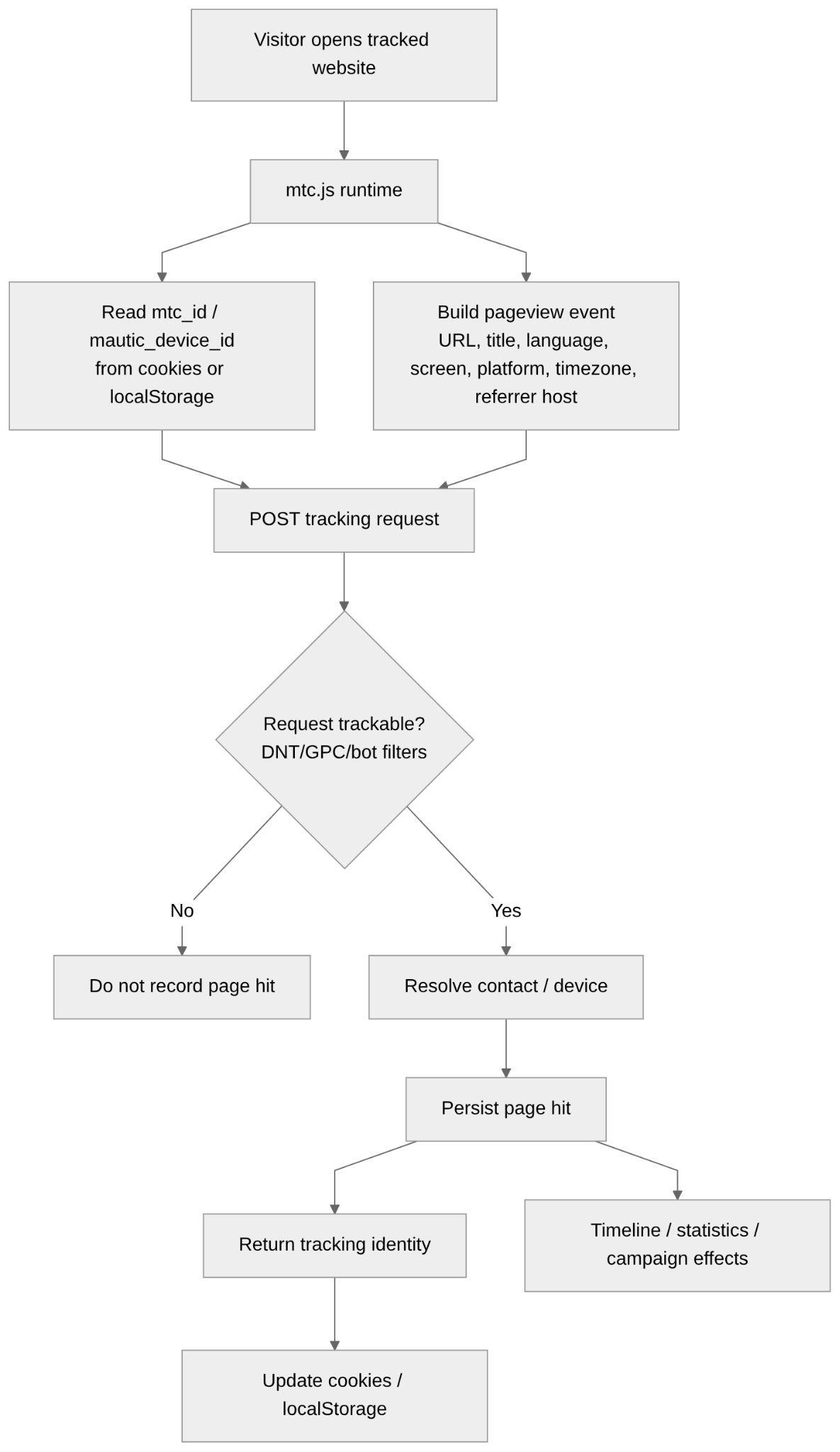
It can collect automatically:
- full page URL;
- page title;
- browser language;
- screen resolution;
- platform info;
- timezone;
- referrer host in the JavaScript path reviewed;
- IP address through the HTTP request;
- browser/device info available or inferred from the request;
- timestamp of the interaction;
- existing Mautic tracking id.
Landing page
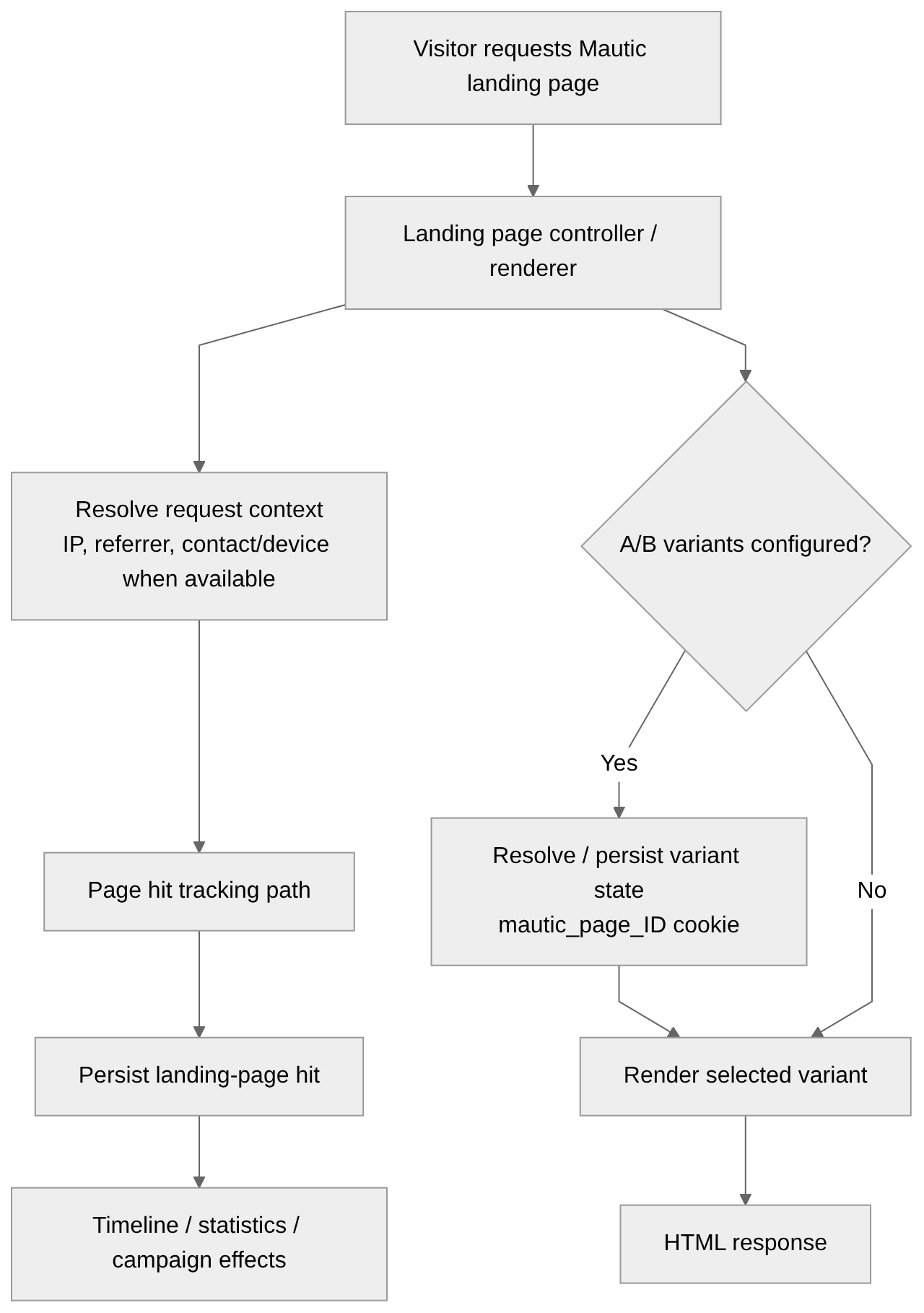
Involves:
- requested page;
- timestamp;
- IP/request info;
- referrer info;
- existing contact/device context;
- page-hit info;
- landing-page statistics;
- A/B variant state where applicable.
Landing-page tracking can feed:
- page-hit history;
- contact timeline;
- page statistics;
- campaign decisions;
- A/B testing statistics.
mtracking.gif web tracking pixel
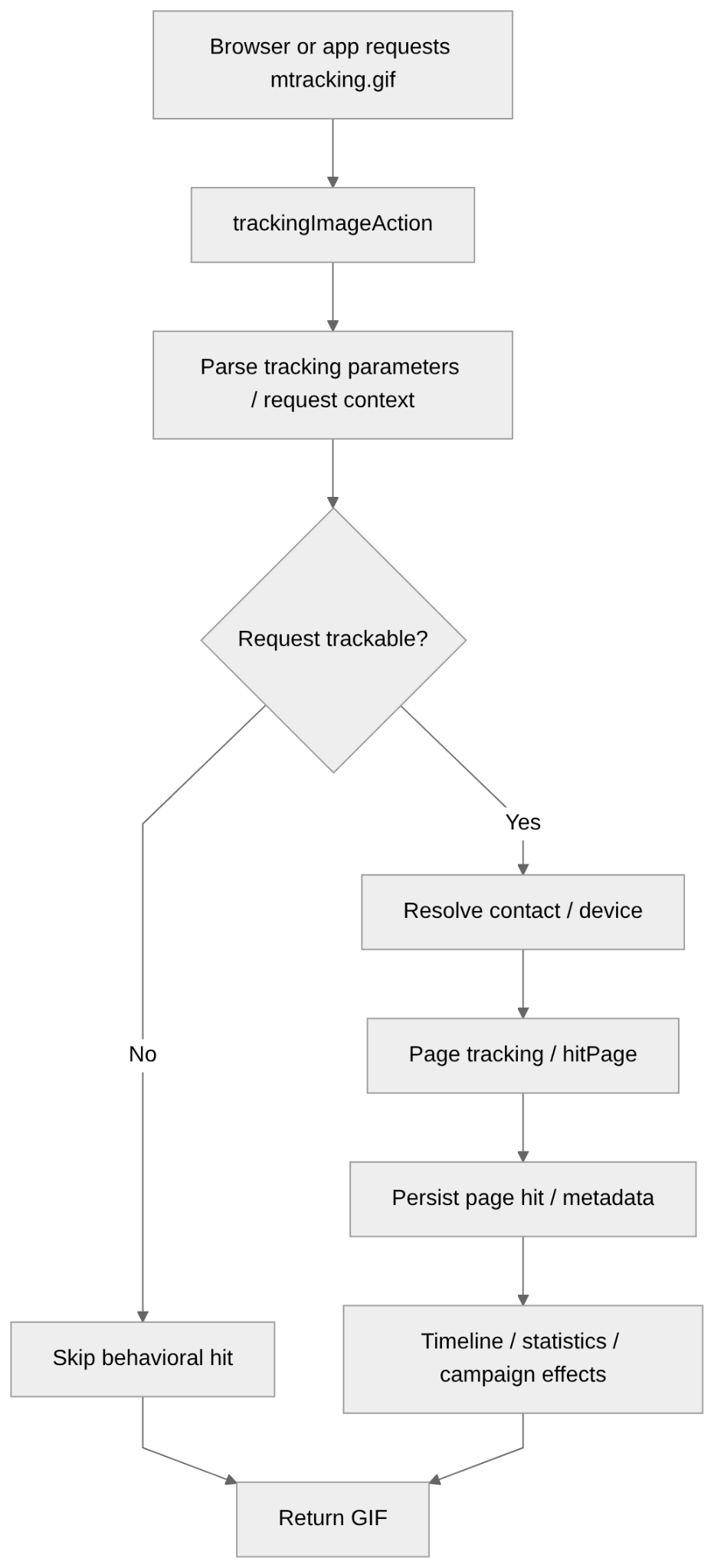
Carry/expose:
- page/tracking parameters;
- URL or page context supplied to the pixel;
- IP/request info;
- timestamp;
- existing contact/device context;
- explicitly supplied tracking values.
Asset download
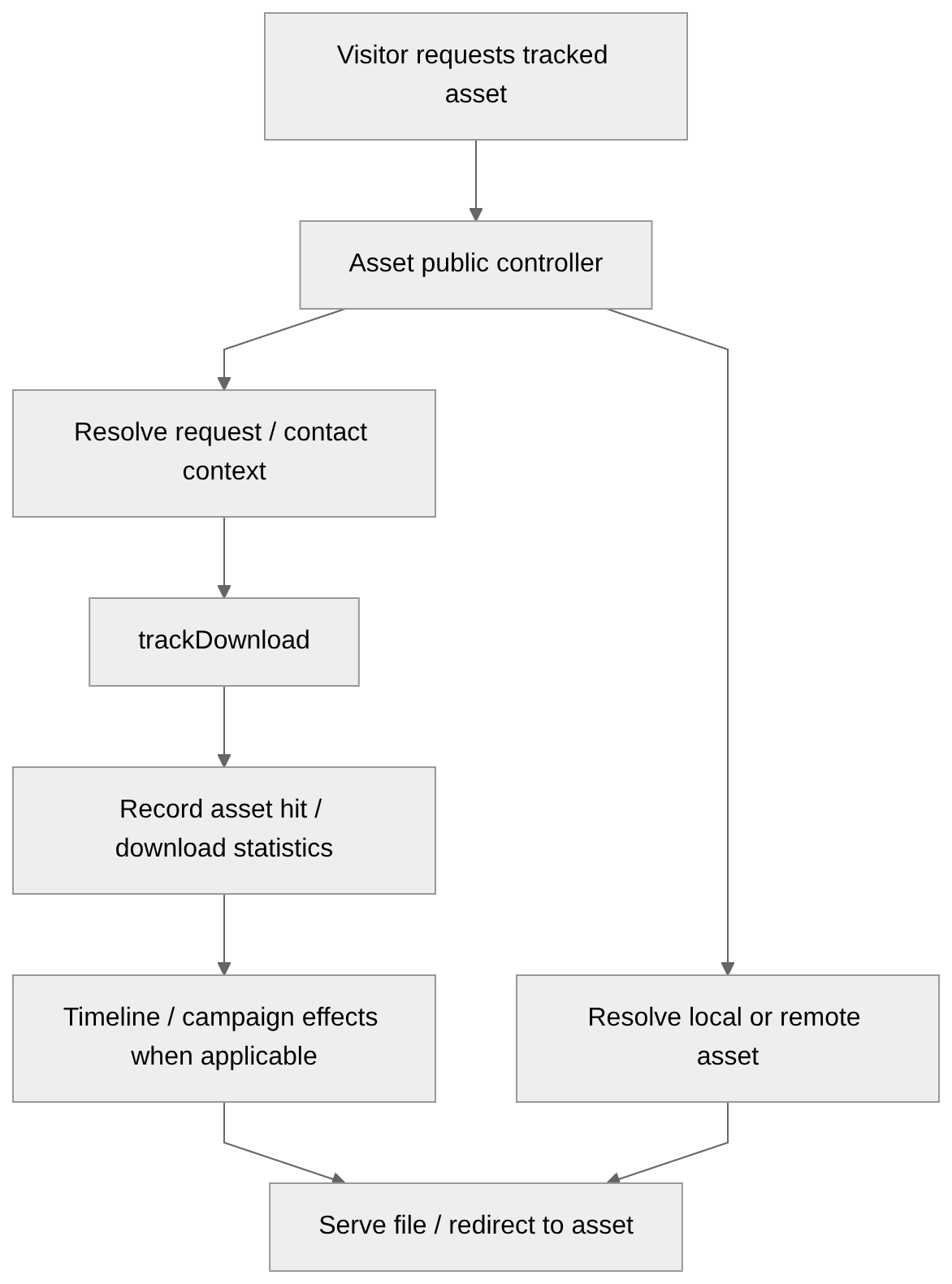
When somebody accesses a tracked asset, Mautic can associate the request with:
- the asset;
- time of access/download;
- request context;
- a contact when identity context is available;
- download/hit statistics.
The resulting activity can feed:
- asset statistics;
- contact timeline;
- campaign decisions or other engagement logic.
Tracked URL redirects / clickthrough
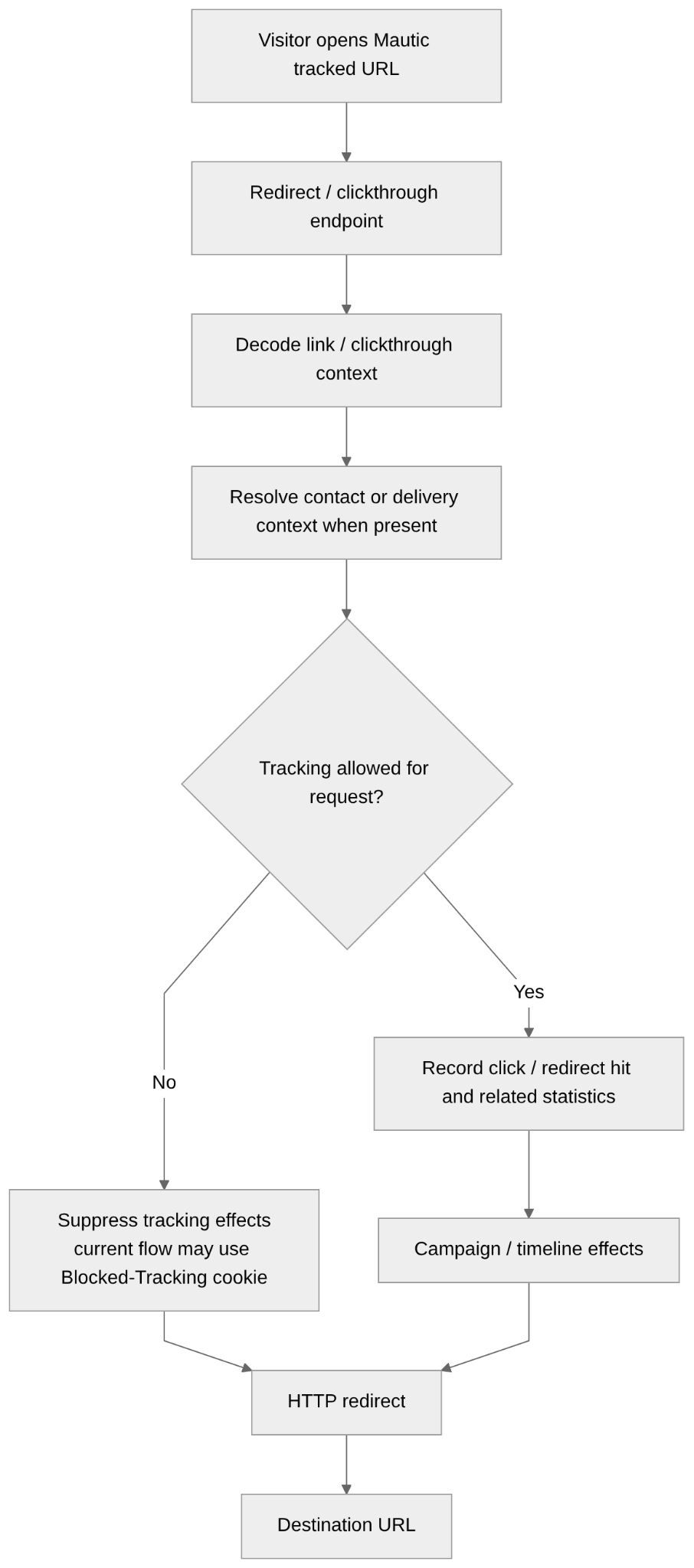
Tracking URL can determine:
- which link was followed;
- campaign/message context;
- contact context when encoded in the tracking URL;
- destination URL;
- click/redirect statistics;
- timestamp/request info.
Email open pixel
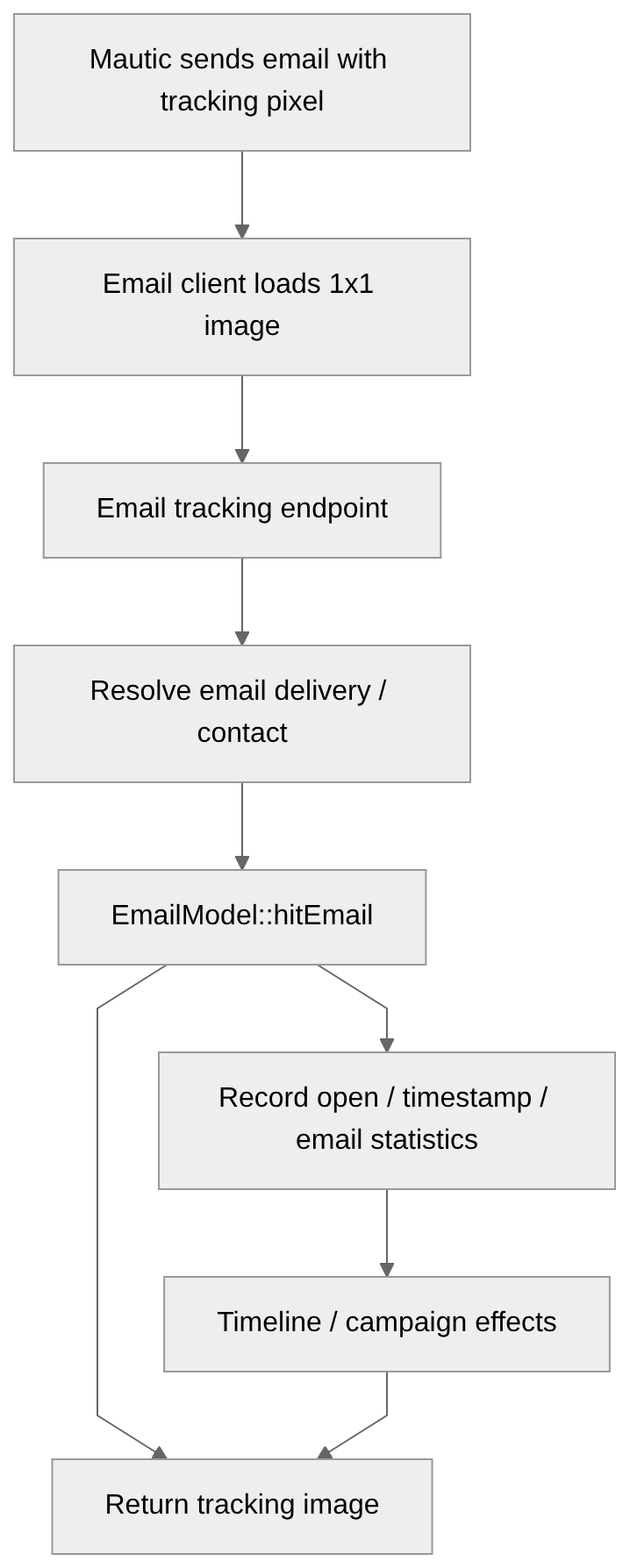
When email client loads that image, Mautic can:
- identify the email delivery/context;
- identify associated contact;
- register an open;
- register the opening time;
- update email statistics;
- generate engagement/timeline effects;
- affect campaign logic based on opens.
Email link click
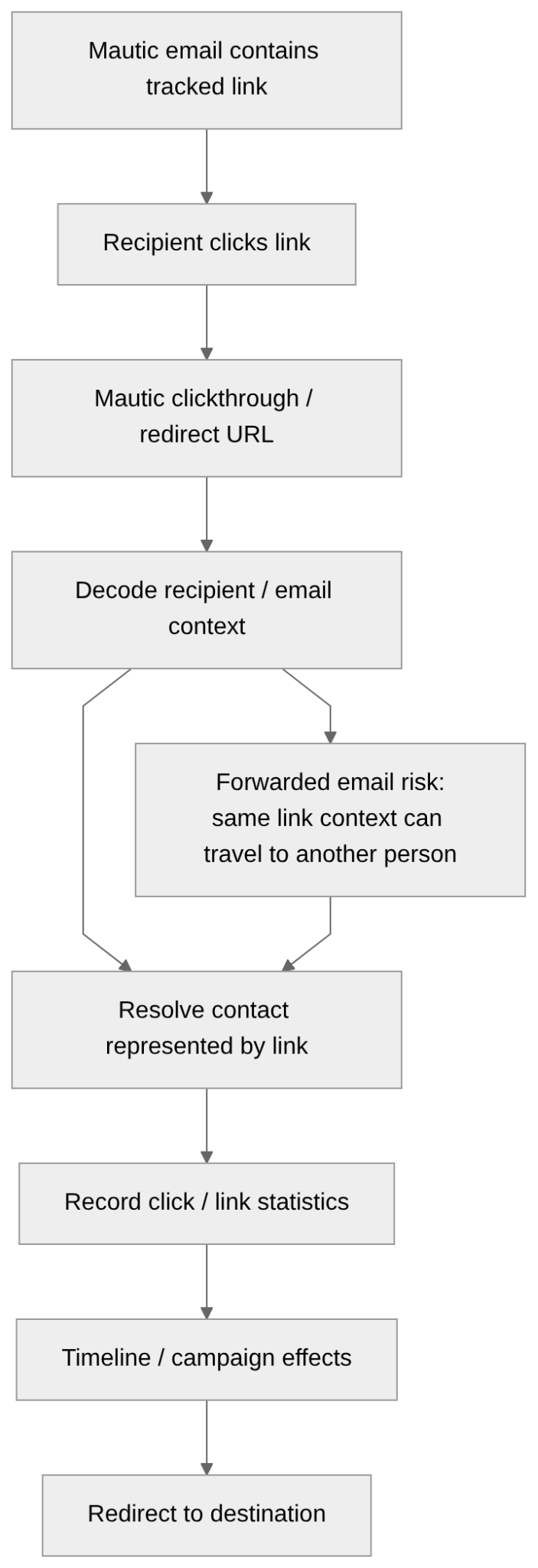
Tracked links in an email have context that allows Mautic to attribute the click to an email/contact.
Mautic can use the click to determine:
- which email was involved;
- which tracked link was clicked;
- which contact the link represents;
- click time;
- destination;
- engagement/statistical info.
Click may then:
- appear in contact engagement history;
- affect campaign execution;
- trigger decisions based on clicks;
- pass through the generic redirect infrastructure.
Focus Item
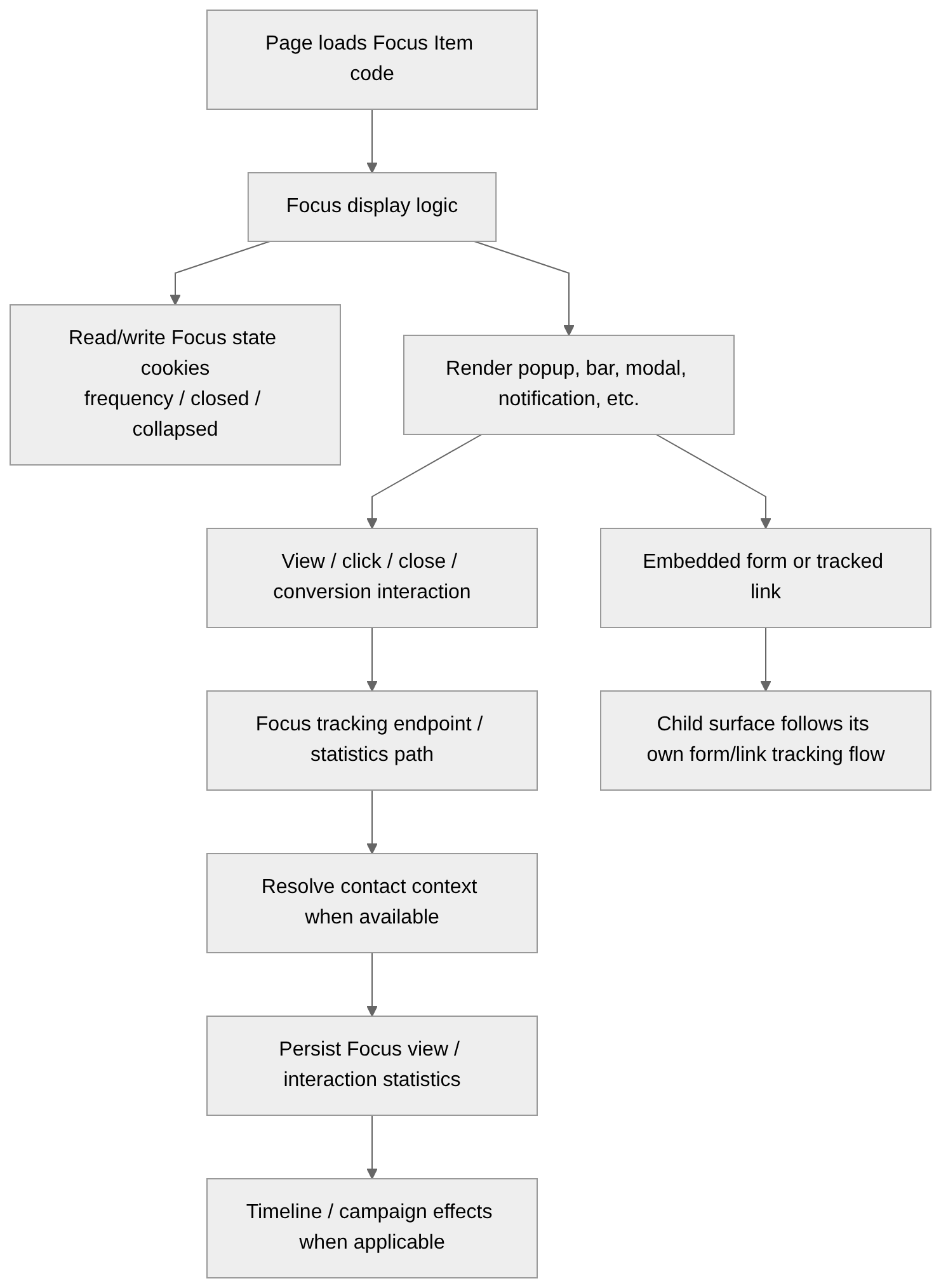
They can observe or persist:
- whether the Focus Item was displayed;
- views;
- clicks/interactions;
- closing/dismissal;
- conversions;
- frequency/state info;
- embedded form activity;
- tracked-link activity.
Video engagement
Can result in:
- a video tracking request;
- identification of the video/content;
- page/context info;
- contact context where available;
- engagement metadata;
- persisted video activity;
- subsequent analytics/timeline/campaign effects.
Explicit data collection/actions
Form submissions
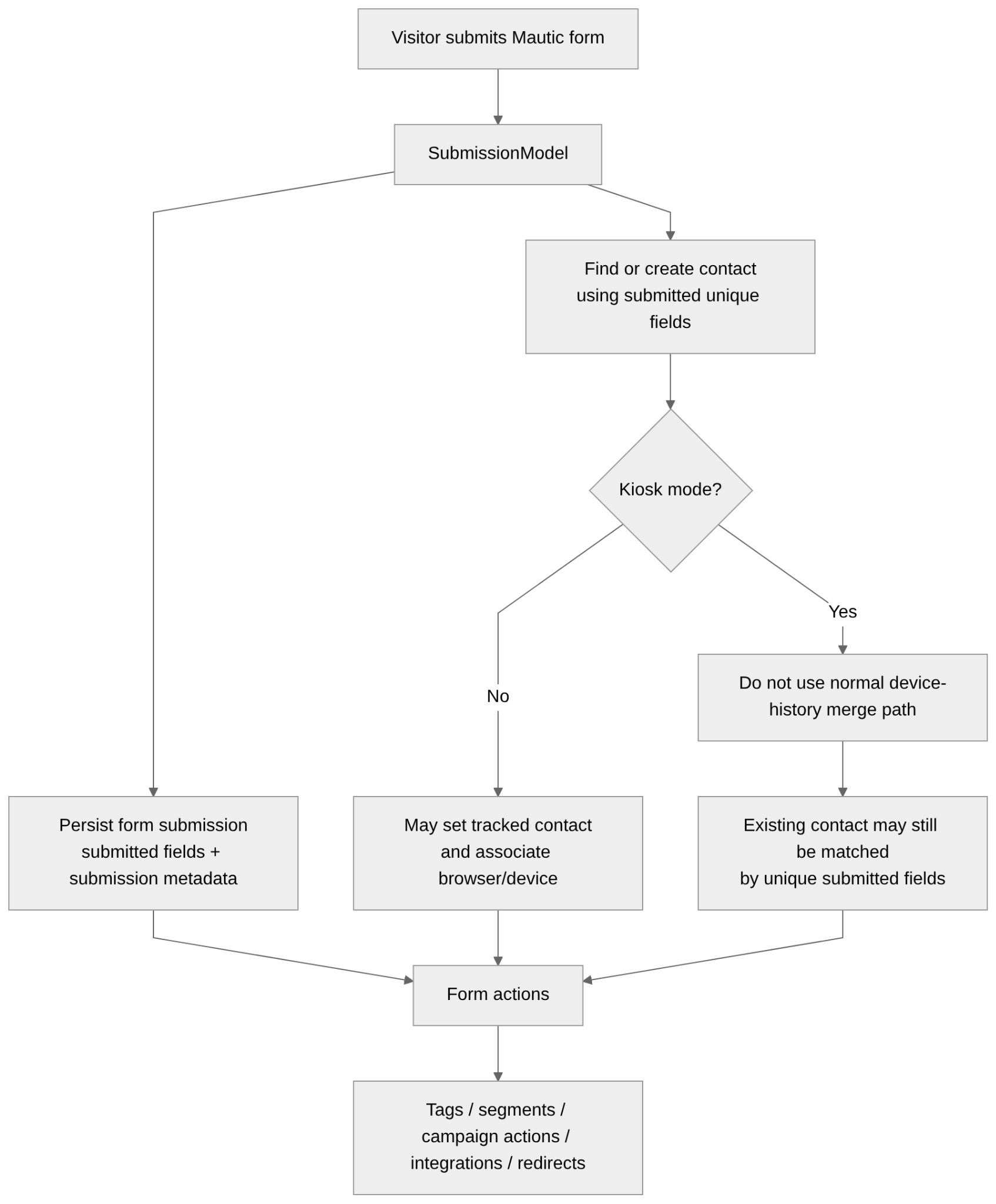
Forms can:
- create contacts;
- update existing contacts;
- match existing contacts using unique fields;
- turn previously anonymous activity into known-contact activity depending on the flow;
- store submitted fields;
- store submission metadata;
- record an IP address on the submission;
- use referrer/context info;
- add tags;
- modify segment membership through subsequent actions;
- trigger campaigns and form actions;
- invoke integrations/webhooks;
- redirect the submitter;
- use known contact data for features such as progressive profiling in ordinary forms.
Kiosk mode
- avoids the normal device-history association behavior;
- does not perform the normal tracked-contact/device merge;
- designed for situations such as events where several people use the same device;
- disables progressive profiling;
- may still match an existing contact using unique fields submitted in the form;
- still creates a submission record;
- still receives an IP address on the submission in the current code path reviewed, even though that IP is not associated with the contact in the same way.
Preference Center
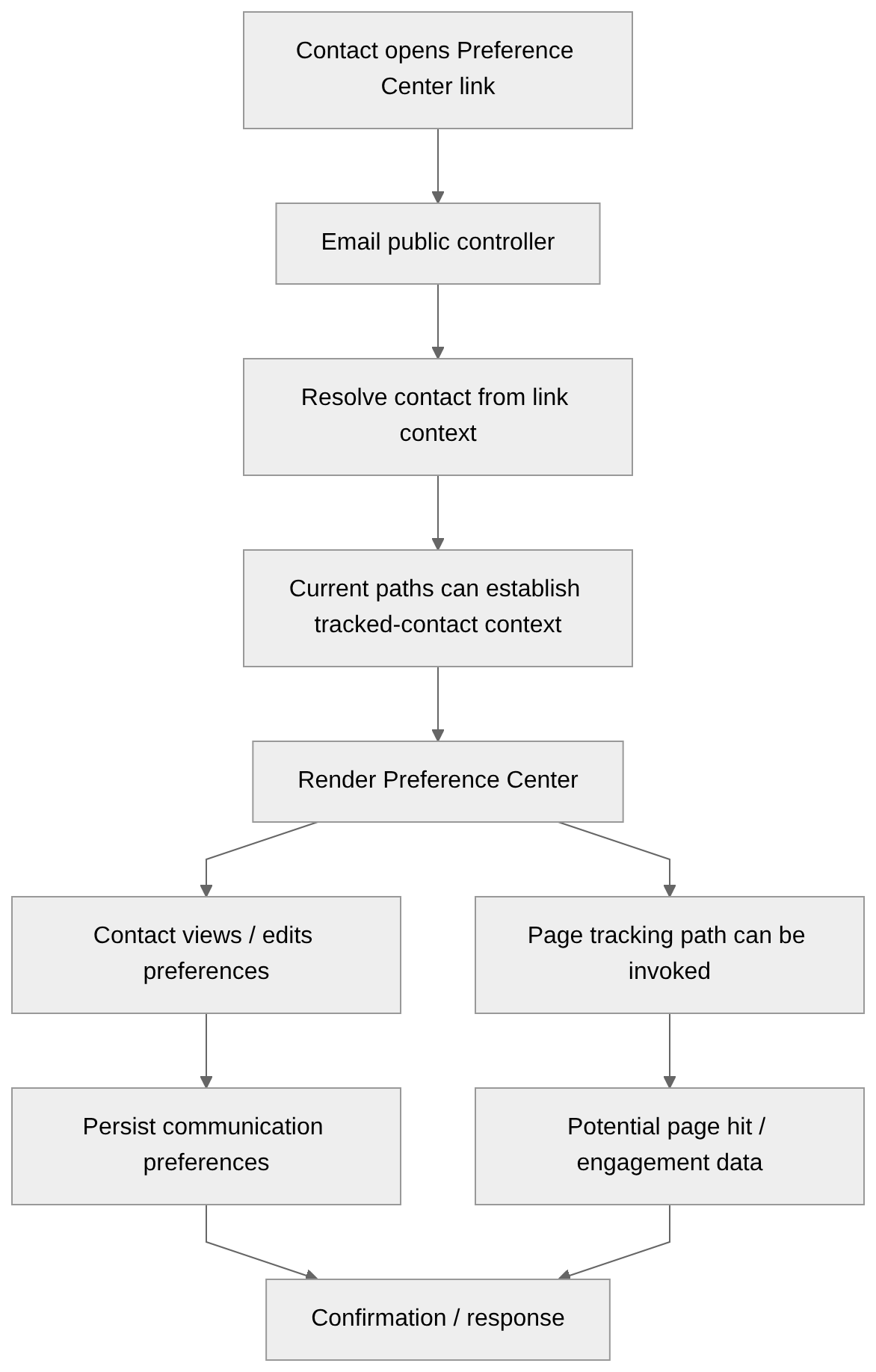
The reviewed email controller contains paths where opening the Preference Center can:
- resolve the contact from the email/link context;
- establish tracked-contact context;
- render a contact-specific Preference Center;
- invoke page tracking;
- persist changes made by the contact.
Unsubscribe and other preference-action links
They carry authority to modify contact state.
Examples:
- unsubscribe;
- resubscribe;
- double opt-in;
They can cause Mautic to:
- resolve a specific contact;
- update Do-Not-Contact/suppression state;
- update communication preferences;
- confirm an opt-in;
- create related contact/audit activity;
- redirect or display a confirmation.
Persistent browser state / identity
Landing-page A/B variant assignment
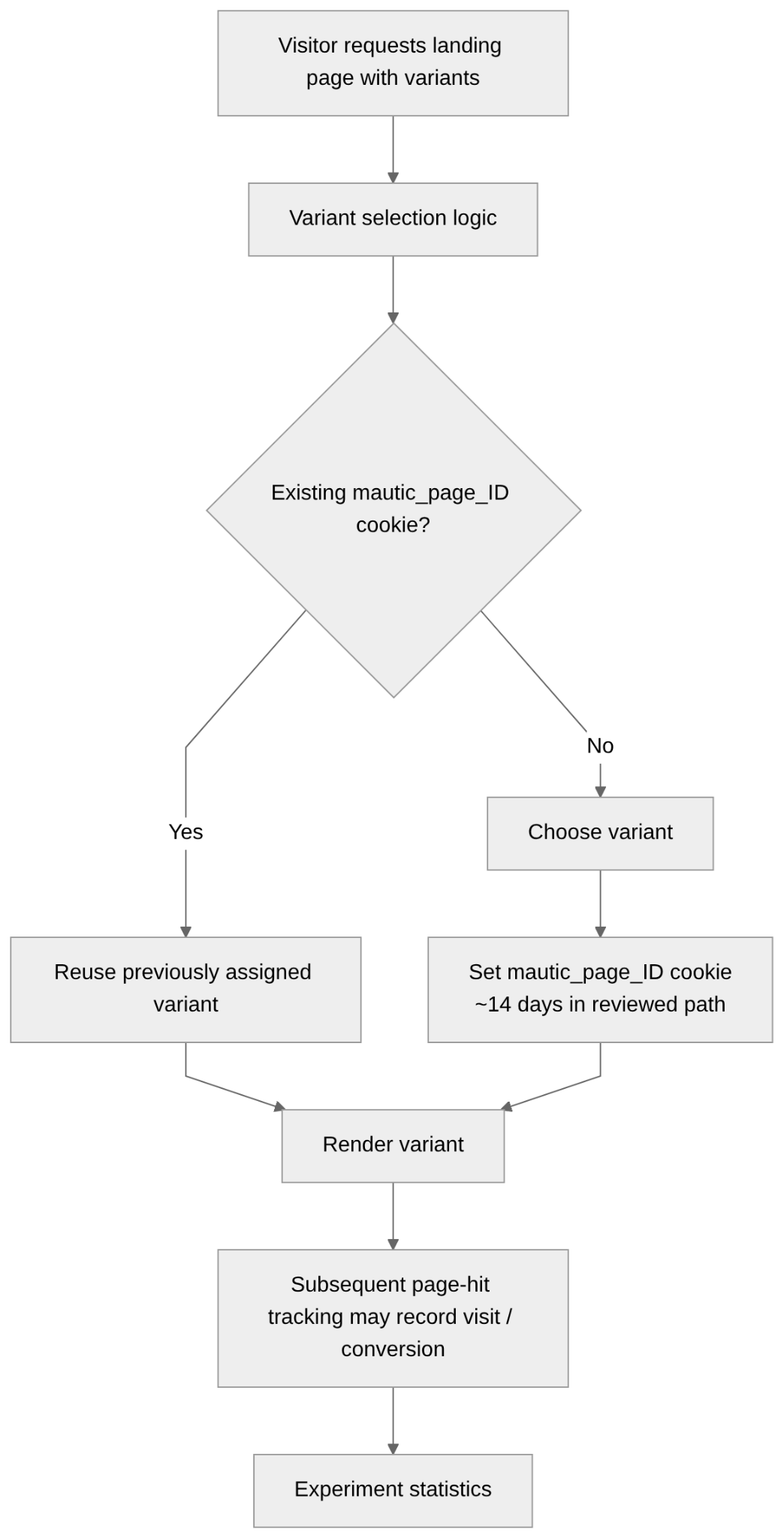
Tracks:
- page version presented to visitor;
- page visited.
Device and contact recognition
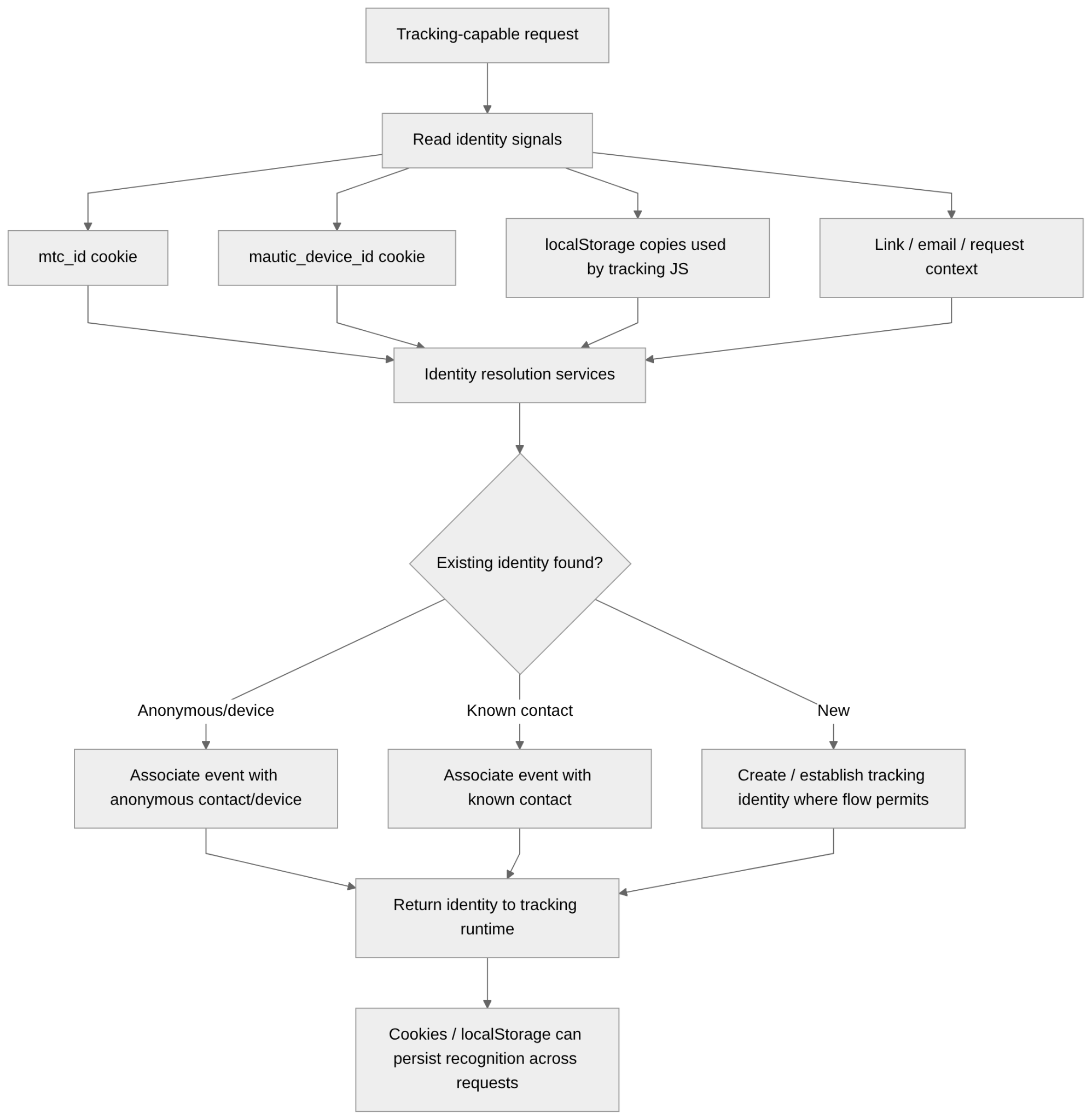
Uses:
- mtc_id;
- mautic_device_id;
- browser localStorage;
- tracking-link context;
- email context;
- form-submitted unique identifiers;
- server-side request/contact context.
Downstream engagement and campaign effects
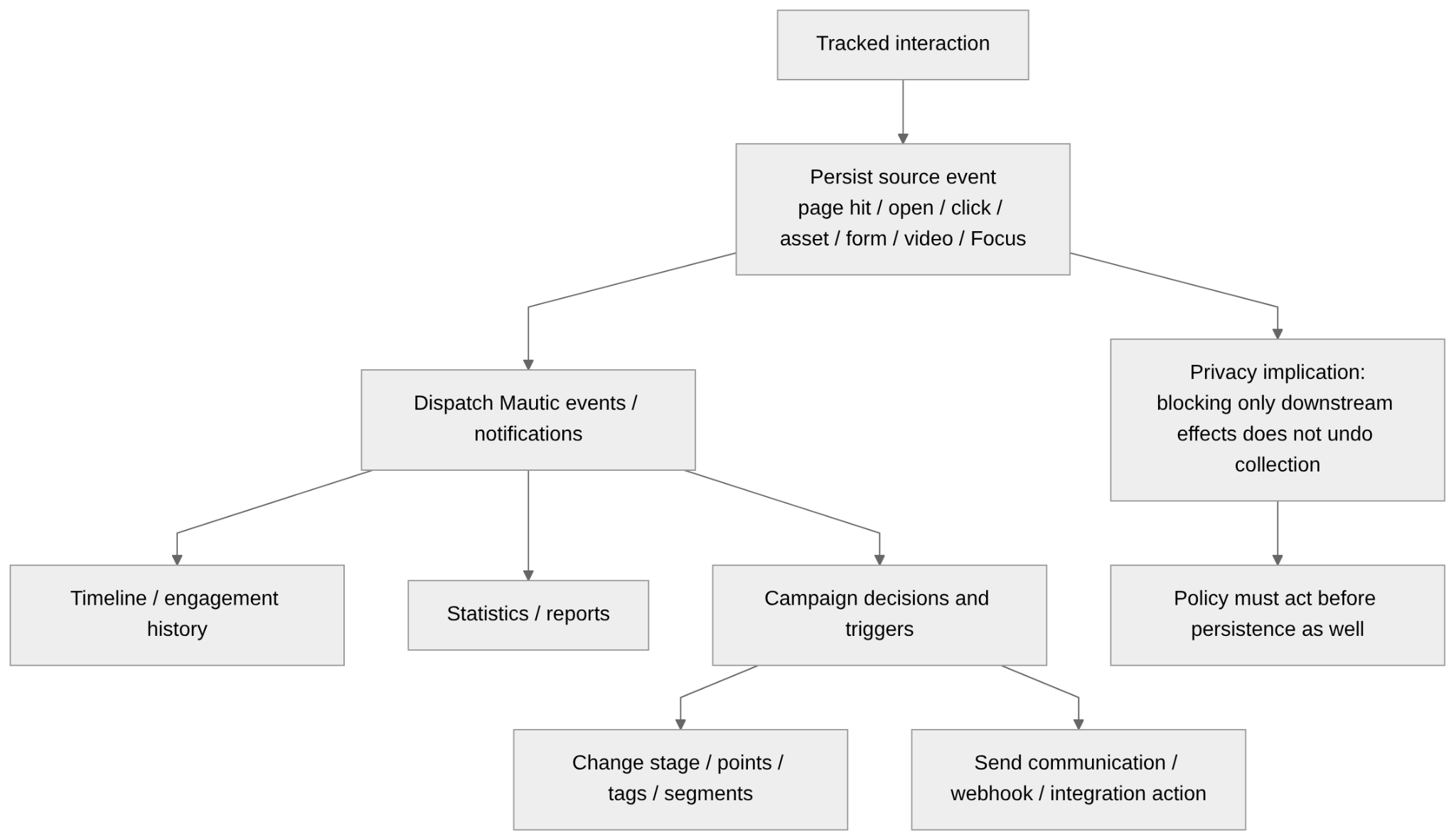
Tracked activity:
- page hits;
- email opens and clicks;
- form submissions;
- asset downloads;
- Focus interactions;
- video interactions;
can feed downstream systems:
- contact timeline;
- engagement history;
- statistics;
- reports;
- campaign decisions;
- campaign progression;
- points;
- stages;
- tags;
- segments;
- communications;
- webhooks;
- integrations.
Cookies set in a default install
How cookies are written
Tracking cookies set before consent
Blocked-Tracking
PHP session cookie
Focus Item cookies
Identifiers outside cookies
Read but not written by current code
Cookies set in a default install
| Cookie | Purpose | Lifetime | Flags | Set before consent? | Class |
|---|---|---|---|---|---|
| mautic_device_id | Recognises the browser/device across visits | 1 year | Secure; not HttpOnly; SameSite=None | Yes | Tracking |
| mtc_id | Carries the internal contact ID for page JavaScript | Session | Secure; not HttpOnly; SameSite=None | Yes | Tracking |
| mautic_referer_id | Links the next request to the previous page hit | 30 minutes | Secure; not HttpOnly; SameSite=None | Yes | Tracking |
| mautic_page_[id] | Keeps an A/B visitor on the same variant | 14 days | Secure; not HttpOnly; SameSite=Lax | Yes, A/B pages only | Functional |
| Blocked-Tracking | Flag: last hit was not trackable | ~15 seconds | Secure; HttpOnly; SameSite=Lax | Yes, on tracked-link redirects | Functional |
| PHP session cookie (hashed name) | Server session for logged-in users | php.ini session.cookie_lifetime (default: until browser close) | SameSite=Lax; HttpOnly; Secure when site_url is https | No for anonymous tracking hits; only on session-touching routes | Essential |
| mautic_lead_avatar_panel | Back-office panel expanded/collapsed | 30 days | SameSite=Strict; not Secure; not HttpOnly | N/A, admin UI only | UI preference |
| mautic_session_id | Legacy Mautic 1.x identifier | Read only, never written | n/a | n/a | Legacy |
| mtc_osid | Web-push subscriber ID | Read only, written by the push SDK | n/a | Only if web push is configured | Third-party |
| mautic_focus_[id] | Focus Item frequency / last engagement | Permanent (Infinity) | Secure; not HttpOnly | Yes, if a Focus Item is embedded | Functional |
| mautic_focus_[id]_closed | Focus Item dismissal counter | Session | Secure; not HttpOnly | Yes, if a Focus Item is embedded | Functional |
| mf-bar-collapser-[id] | Focus bar collapse direction | Session | Secure; not HttpOnly | Yes, if a Focus bar is embedded | UI preference |
How cookies are written
Server-side cookies go through CookieHelper (app/bundles/CoreBundle/Helper/CookieHelper.php), flushed on kernel.response. Defaults from app/bundles/CoreBundle/Config/config.php:
- cookie_path is "/", so every cookie is site-wide;
- cookie_domain is empty, so cookies are host-only;
- cookie_secure is true;
- cookie_httponly is false, so every cookie written this way is readable by JavaScript, by design;
- default expiry 1800 seconds, default SameSite is Lax.
Three paths bypass the helper:
- Blocked-Tracking, created as a raw new Cookie(...) in PublicController.php:546;
- the page tracking script, which writes from the browser via MauticJS.setCookie() in BuildJsSubscriber.php:74;
- the Focus embed script (plugins/MauticFocusBundle/Resources/views/Builder/generate.js.twig), which carries its own cookies.js and writes document.cookie directly.
Tracking cookies set before consent
Written for any anonymous visitor on a tracked page, landing page, mtracking.gif pixel, tracked link or asset link, with no consent check:
- mautic_device_id, a 23-character random device ID, written in DeviceTrackingService.php:132, mirrored by mtc.js in BuildJsSubscriber.php:233;
- mtc_id, the internal contact ID, written in DeviceTrackingService.php:135, mirrored by mtc.js in BuildJsSubscriber.php:232, exposed to any script on the page;
- mautic_referer_id, the last page-hit row ID, written by PageModel.php:471.
None of the three is HttpOnly, which is deliberate so mtc.js can read them. Server-side order: DeviceTrackingService::trackCurrentDevice() sets mautic_device_id and mtc_id, then PageModel::hitPage() sets mautic_referer_id.
Blocked-Tracking
Written in PublicController.php:546 on the /r/ redirect route, value 1 or 0, about 15 seconds, HttpOnly (Symfony Cookie default when only name/value/expire are passed). Read back in ContactTracker.php:54 and PageModel.php:398 to skip a double count when tracking is blocked by DNT or an untrackable IP. Audit point: a request whose tracking is blocked still writes this cookie, so "tracking blocked" and "no storage written" are separate acceptance criteria for 5d.
PHP session cookie
Framework session config is app/config/config.php:65-70. The name is md5(md5(local_config_path) . secret_key), 32 hex chars, built in CoreBundle/Loader/EnvVars/SessionEnvVars.php:16. Flags are set by Mautic, not left to php.ini:
- cookie_samesite is "lax" (explicit, config.php:69);
- cookie_secure is $secureCookie, which is true when site_url starts with https (config.php:42-43);
- cookie_httponly is not set in the framework config, so the Symfony FrameworkBundle default of true applies and is passed to the session storage;
- cookie_lifetime is not set, so it follows php.ini session.cookie_lifetime, default 0, meaning until the browser closes. This is the only session-cookie attribute that depends on the deployment.
It is not set for a plain anonymous tracking hit. The tracking routes fall under the public firewall (app/config/security.php:111-114), which is lazy, so authentication does not start a session on its own. No controller on the tracking path calls $request->getSession(), and TrackingHelper uses a cache backend keyed by contact ID (TrackingHelper.php:47-50), not the session. A session cookie is created only by routes rendered through a controller that touches the session: the admin back office, the preference-centre POST, and form submissions that set flash messages. Worth one runtime check with a fresh browser hitting /mtc.js, /mtracking.gif and a landing page, but the static answer is no.
CSRF protection is on (config.php:56) but the token lives in the session, so there is no CSRF cookie.
Focus Item cookies
Anderson surface: Focus Item. A Focus Item embedded on a third-party site loads mautic_focus_generate as a script tag; its inline cookies.js writes three cookies with "; secure", none HttpOnly, no explicit SameSite:
- mautic_focus_[id], last-engagement timestamp for frequency capping, generate.js.twig:497, Infinity expiry, path "/", so effectively permanent; set to -1 on conversion (generate.js.twig:649);
- mautic_focus_[id]_closed, dismissal counter, generate.js.twig:682, session;
- mf-bar-collapser-[id], bar collapse direction, generate.js.twig:157, session.
Functional, not behavioural, but still written with no consent step. 2d must cover them; 5d must assert them absent in a default install.
Identifiers outside cookies
mtc.js also writes mtc_id and mautic_device_id into localStorage (BuildJsSubscriber.php:239-240), no expiry, as a fallback when cookies are unavailable or Mautic is on a different domain. Clearing the cookies without clearing localStorage does not clear the identity, which matters for 2f.
Read but not written by current code
- mautic_session_id, read in ContactTrackingService.php:74, a Mautic 1.x leftover honoured if a proxy or old script supplies it;
- mtc_osid, read in NotificationBundle/Helper/NotificationHelper.php:165, written by the web-push provider's SDK.
Outbound third-party calls
updates.mautic.org and api.github.com
gravatar.com
Marketplace and Google Fonts
Calls that exist but are off by default
Dependencies capable of outbound calls (composer.lock)
Outbound third-party calls
"In a default install" means with nothing configured by an admin. "By the browser" means the server emits a tag or URL and the admin's or visitor's browser makes the request.
| Destination | Trigger | Data sent | How to disable |
|---|---|---|---|
| updates.mautic.org/stats/send (POST) | Admin loads a back-office page (checked at most once/hour per session), but the actual POST only fires if the local update-check cache is >3h old. | Mautic version, PHP version, DB driver, server OS, install source, instanceId = sha1(secret_key + install_source + db_driver) | stats_update_url = '' in config/local.php, or disableUpdates = true |
| api.github.com/repos/mautic/mautic/releases (GET) | Same update check. On by default. | Nothing in the body; GitHub sees the instance IP and User-Agent | system_update_url = '', or disableUpdates = true |
| gravatar.com/avatar/ + MD5 of the email | Rendered as an image by the browser on the contact detail view, the card/grid contact view, global search results, and the user-management screens (user list, user profile). Contact avatar source defaults to gravatar (LeadBundle/Entity/Lead.php:233), with a gravatar fallback in AvatarHelper.php:79. Not rendered in the default contact table view. On by default. | MD5 of the email address; the d= parameter also passes this instance's URL to Gravatar/Automattic | Milestone 2g adds a toggle. Today: change the avatar source, or block gravatar.com |
| raw.githubusercontent.com/mautic/marketplace-allowlist + Packagist | Marketplace is enabled by default; nothing fetched until an admin opens the Marketplace screen | Nothing sensitive; GitHub and Packagist see the instance IP | marketplace_enabled = false |
| fonts.googleapis.com and fonts.gstatic.com | Editor font list (config.php:1346+) with Google-hosted fonts; loaded by the builder iframe and by any email or landing page that uses one | Nothing; Google sees the viewer's IP and the referring page | Use system fonts, or self-host |
updates.mautic.org and api.github.com
The update check runs from NotificationModel::getNotificationContent() when an admin opens any back-office page and the last check is over an hour old. It calls UpdateHelper::fetchData(), which first checks a local cache file (lastUpdateCheck.txt, via checkCachedUpdateData(), UpdateHelper.php:263-279) and only proceeds to sendStats() (UpdateHelper.php:198-235, URL config.php:1343) if that cache is older than 3 hours — so in practice the POST fires roughly every 3h per instance, not on every hourly check. It then runs fetchLatestCompatibleVersion().
gravatar.com
GravatarHelper.php:47-54 builds gravatar.com/avatar/ + md5(strtolower(trim(email))) + size + a d= default that resolves to an absolute URL on this instance. The request is made by whichever browser renders the view. AvatarHelper::getAvatar (AvatarHelper.php:56-88) returns a gravatar URL whenever there is no custom upload and no social image, which is the default state for a contact. It is not called from the contact list template; it is called from Lead/lead.html.twig (detail), Lead/grid_card.html.twig, SubscribedEvents/Search/global.html.twig, and the UserBundle list and profile views.
Marketplace and Google Fonts
Marketplace allowlist URL in MarketplaceBundle/Config/config.php:89; MARKETPLACE_ENABLED defaults to true (MarketplaceBundle/Service/Config.php:11,22); no traffic until the screen opens. The font list in config.php includes Bitter, Droid Serif, Lato, Open Sans, PT Sans and others with fonts.googleapis.com URLs; any used in built content pulls the file from Google for the recipient.
Calls that exist but are off by default
| Destination | Enabled by |
|---|---|
| Google Analytics (googletagmanager.com/gtag/js) | Setting a google_analytics snippet or ID. GA also receives user_id = the contact ID when known; anonymize_ip only if separately enabled. |
| Meta pixel (connect.facebook.net/en_US/fbevents.js) | Setting facebook_pixel_id. Advanced Matching then sends firstname, lastname, email, phone, city, state, zipcode to Meta (BuildJsSubscriber.php:226-241). |
| mautic.github.io/motd/motd.json | Admin schedules the mautic:motd command. |
| language-packs.mautic.com | Browsing Configuration, Languages, or installing a language pack. |
| download.maxmind.com/app/geoip_download | A MaxMind licence key is set (ip_lookup_auth, empty by default) and the DB download is run. Default service maxmind_download (config.php:916) otherwise reads a local .mmdb file, no per-request call. Licence key travels in the URL query string. |
| geoip.maxmind.com/geoip/v2.1 | Switching ip_lookup_service to a paid MaxMind precision service; sends the looked-up IP + auth per lookup. |
| api.maxmind.com/privacy/exclusions | The mautic:do-not-sell:update console command. |
| ipstack, GeoIPs, Telize and other IP-lookup providers | Selected as ip_lookup_service; each sends the looked-up IP + provider key. |
| Mail provider (SMTP or API) | Configured by the admin; no default. Sends the full message and recipient address to that provider. |
| Webhooks | A webhook is created; POSTs event payloads, including contact data, to the configured URL. |
| CRM, social and other integrations | An integration is enabled and authorised. |
| GitHub, Packagist, getcomposer.org | An explicit install or update. |
Dependencies capable of outbound calls (composer.lock)
| Package | Used for | Traffic by default |
|---|---|---|
| guzzlehttp/guzzle, symfony/http-client, php-http | HTTP clients behind every call above | Only what the callers trigger |
| geoip2/geoip2, maxmind-db/reader, maxmind/web-service-common | MaxMind GeoIP: local .mmdb reader (default) + optional web-service client | Local file read only, unless a precision service or download is configured |
| symfony/mailer + transport packages | Outbound mail to the configured DSN | None until an email is sent |
| aws/aws-sdk-php | Only if an AWS mail transport, SES or S3 filesystem is configured | None by default |
No analytics or telemetry SDK ships as a PHP dependency; Google Analytics and the Meta pixel are injected as script tags.
What the 7.2 consent workstream already covers
Coverage per cookie and surface
Reading of the gap
What the 7.2 consent workstream already covers
The MOU asks for a code-level check of what the existing consent work covers, so 1a can say what is already done versus what each later milestone still has to build.
The main mechanism already in place is IpLookupHelper::isRequestTrackable() (merged in PR #15844, IpLookupHelper.php:279-311). It returns false, so no tracking, when the request is a HEAD request, a prefetch or prerender, carries Sec-GPC: 1, carries DNT: 1, or comes from a bot or a do-not-track IP. It is called before behavioural persistence in these paths:
- PageModel::hitPage(), IpLookupHelper check at PageModel.php:402, before the Hit is written and before mautic_referer_id is set at :471;
- ContactTracker::getContactByTrackedDevice() at :224 and getContactByIpAddress() at :256, before a contact is resolved or created;
- AssetModel, asset download tracking, at AssetModel.php:118;
- EmailModel, email open tracking, at EmailModel.php:425.
The second piece is the mautic-essential.js split referenced by milestone 2a (PR #16660). It separates the essential form script from the tracking script, but it is groundwork: it does not yet gate any cookie or call at runtime.
Coverage per cookie and surface
| Item | Covered by 7.2 consent work? | Notes / owning milestone |
|---|---|---|
| mautic_device_id, mtc_id (server) | Yes, on the page-hit and pixel path | hitPage() returns at :402 on DNT/GPC before trackCurrentDevice() runs, so the device cookies are not written |
| mautic_referer_id | Yes | Written at hitPage:471, after the :402 guard |
| Page hit, mtracking.gif page pixel | Yes | isRequestTrackable() at PageModel.php:402 |
| Asset download tracking | Yes | isRequestTrackable() at AssetModel.php:118 |
| Email open pixel | Yes | isRequestTrackable() at EmailModel.php:425 |
| Tracked URL redirect | Partly | The hit is guarded, but Blocked-Tracking is still written on the non-trackable path by design; 2b and 5d must treat "cookie written" and "tracking suppressed" separately |
| mtc.js client-side cookie/localStorage writes | Needs verification | /mtc/event should return no id under DNT/GPC so setCookie gets nothing; confirm at runtime |
| mautic_page_[id], A/B variant cookie | No | Written in PublicController.php:215 in the page-render path, no isRequestTrackable() guard; owned by milestone 2b |
| Focus Item cookies (mautic_focus_[id], _closed, mf-bar-collapser) | No | Pure client-side JS in the embed script, no server-side consent check; owned by milestone 2d |
| Video engagement | Needs verification | VideoModel::hitVideo is not among the isRequestTrackable() callers; Anderson flagged the same, owned by milestone 3b or 2c |
| Google Analytics, Meta pixel | No | Injected by BuildJsSubscriber with no consent gate in core; owned by milestone 5b |
| Gravatar outbound call | Not applicable to visitor consent | Admin-side; owned by milestone 2g |
| updates.mautic.org, api.github.com, Marketplace, fonts | Not applicable to visitor consent | Admin or server side; disable via config as in the table above |
Reading of the gap
DNT and GPC are already respected for the core behavioural paths: page hits, the page pixel, asset downloads and email opens. What the consent workstream does not yet cover, and what the later milestones therefore own, is: the A/B variant cookie (2b), the Focus Item cookies (2d), the video path (2c or 3b, pending runtime confirmation), the client-side mtc.js writes (verify), the persistence-before-event ordering that Anderson describes for downstream effects, and Google Analytics and the Meta pixel (5b). There is also no consent concept beyond DNT and GPC headers: no stored per-contact tracking preference and no cookie-banner integration point, which is the whole of milestone 5b.
What the tool itself needs for GDPR compliance
| Area | What it should support | Status |
|---|---|---|
| Lawful basis | Record the lawful basis for processing, ideally per purpose, not just one global “GDPR = yes” field | Missing |
| Purpose limitation | Differentiate processing, tracking, communication etc | Missing |
| Consent management | Capture, store and prove consent (what was consented to, when, how, and which wording/version was shown) | Missing |
| Granular consent | Separate purposes/channels instead of one giant “I agree to everything people might someday invent” checkbox | Missing |
| Consent withdrawal | Allow consent to be withdrawn as easily as it was granted, and propagate the change through automation | Partial for email/SMS |
| Objections | Support objection to processing, particularly direct marketing, and ensure campaigns cannot simply start sending again | Weak |
| Suppression | Maintain suppression/do-not-contact state without requiring continued marketing processing | Weak |
| Data subject access | Find and export all personal data associated with a person | Weak |
| Rectification | Correct inaccurate personal data, registering evidence | Partial |
| Erasure | Delete or anonymize personal data where the right to erasure applies | Weak |
| Restriction | Freeze processing without necessarily deleting the underlying data | Missing |
| Portability | Export applicable personal data in a commonly used, machine-readable format | Partial |
| Profiling controls | Identify/profile processing and allow it to be stopped where required | Missing |
| Retention | Automatically remove/anonymize data after configurable retention periods | Partial |
| Data minimization | Allow collection/storage of only necessary data and avoid mandatory irrelevant fields | Partial |
| Tracking controls | Prevent tracking before the relevant legal condition is satisfied where consent is required | Weak |
| Anonymous/private tracking | Ideally permit aggregate or genuinely anonymous analytics without creating persistent identifiable profiles | Missing |
| Audit logs | Record relevant privacy operations, access and changes | Partial |
| Permissions | Fine-grained RBAC so every employee cannot casually browse the behavioral history of the entire internet | Weak |
| Security | Encryption, authentication, access controls, backups, incident controls, etc. | Partial |
| Integrations | Propagate consent/deletion/restriction state to connected systems | Weak |
| API privacy controls | All privacy capabilities should also work through APIs, imports, integrations and background jobs | Weak |
Teilen